You probably know the feeling. Social media matters, but it keeps slipping to the edge of the workday. Posts go out late, reporting takes too long, and every automation pitch sounds like a shortcut to bland, robotic content.
That tension is real. Most businesses don't need “full automation.” They need a system that removes repetitive work without handing over judgment, voice, or customer relationships. That's the difference between a weak content machine and a practical operating model.
A better approach is to treat automation as support infrastructure. Use it for recurring tasks like reporting, scheduling, alerts, and workflow routing. Keep humans responsible for strategy, final copy, approvals, and conversations. If you're still sorting out the basics of scheduling social media content, start there, then build upward into a controlled workflow. It also helps to understand how social fits inside a broader operating model for modern social media marketing, especially if your team is balancing brand building with lead generation.
Table of Contents
- Introduction The Smart Way to Automate Social Media
- Laying the Foundation with a Clear Strategy
- Designing Your Human-in-the-Loop Workflow
- AI Content Production Without Sounding Like a Robot
- Common Pitfalls and How to Avoid Them
- Scaling Your Social Media Automation Strategy
Introduction The Smart Way to Automate Social Media
Automating social media works best when you stop thinking about it as “less human work” and start thinking about it as better human allocation. Founders and marketing leaders usually don't struggle because they lack publishing tools. They struggle because content, approvals, timing, reporting, and follow-up all compete for attention at once.
That's why weak automation setups fail. They automate the visible part, publishing, but ignore the operational part, governance, review, and feedback loops. The result is usually one of two problems. Either the brand sounds generic, or the team loses trust in the system and goes back to doing everything manually.
Practical rule: Automate the repeatable steps. Keep people in charge of the judgment calls.
A strong setup does three things well:
- Removes repetitive work: Scheduling, recurring reports, reminders, and routing can run automatically.
- Protects brand quality: Humans still edit, approve, and tailor content for context.
- Preserves real relationships: Customer comments, complaints, and nuanced conversations stay human-led.
The rest of this playbook focuses on that model. Not tool hype. Not “set it and forget it.” Just a practical way to build an automation system that saves time, improves consistency, and still sounds like your company.
Laying the Foundation with a Clear Strategy
Tools don't fix unclear marketing. They just make unclear marketing happen faster.
Before you automate anything, decide what social media is supposed to do for the business. Some companies need demand generation. Others need stronger visibility with referral partners, recruiting support, customer education, or a more consistent brand presence. Those goals require different content, workflows, and review standards.

Start with the business outcome
If your team says, “We want to post more consistently,” that's not a strategy. That's an activity goal.
A better planning conversation sounds like this:
| Business priority | Social media job | What the workflow should support |
|---|---|---|
| Brand awareness | Reach the right audience repeatedly | Consistent publishing and message discipline |
| Lead generation | Drive clicks and conversions | Clear offers, landing page alignment, campaign tracking |
| Customer education | Explain products or services clearly | Content sequencing, repurposing, and FAQ-based topics |
| Reputation management | Monitor and respond appropriately | Alerts, mention tracking, and escalation rules |
That structure matters because social media automation platforms enable businesses to track specific key performance indicators including engagement rates, click-through rates, and conversion metrics, allowing for data-driven optimization of campaign strategies rather than guesswork, as noted by Mindmatrix on social media automation benefits.
Choose KPIs that match the job
Once the goal is clear, pick a short KPI set. Most first-time automation systems break because teams track too much, then use none of it.
Use a narrow scorecard:
- For awareness: Engagement rate and content reach are useful leading indicators.
- For traffic: Click-through rate shows whether the post and offer connect.
- For business impact: Conversion metrics matter more than vanity engagement.
- For operational health: Track whether posts are being approved and published on time.
If your KPI dashboard doesn't help someone decide what to do next, it's reporting theater.
A simple dashboard in Google Sheets, Looker Studio, or your social platform is enough at the start. What matters is consistency. Review the same metrics on the same cadence so you can spot patterns and make decisions.
Document voice before you automate anything
Most brands skip this step and regret it later.
A brand voice guide doesn't need to be fancy, but it does need to be usable. Write down the basics your team needs when creating posts:
- Tone range: Direct, polished, warm, opinionated, technical, conversational.
- Words to use: Industry terms, product names, recurring phrases, approved descriptors.
- Words to avoid: Clichés, overhyped claims, jargon, slang that doesn't fit.
- Point of view: What your company believes, challenges, or consistently emphasizes.
- Platform differences: LinkedIn may support a more strategic tone than Instagram or Facebook.
Include examples from your own past content. Show what “good” looks like. That gives writers, editors, and AI tools a real standard instead of vague instructions like “sound professional.”
When businesses start automating social media before this step, they usually get quantity without consistency. A documented voice is what keeps automation from flattening your brand.
Designing Your Human-in-the-Loop Workflow
A good workflow isn't organized around software features. It's organized around who decides what.
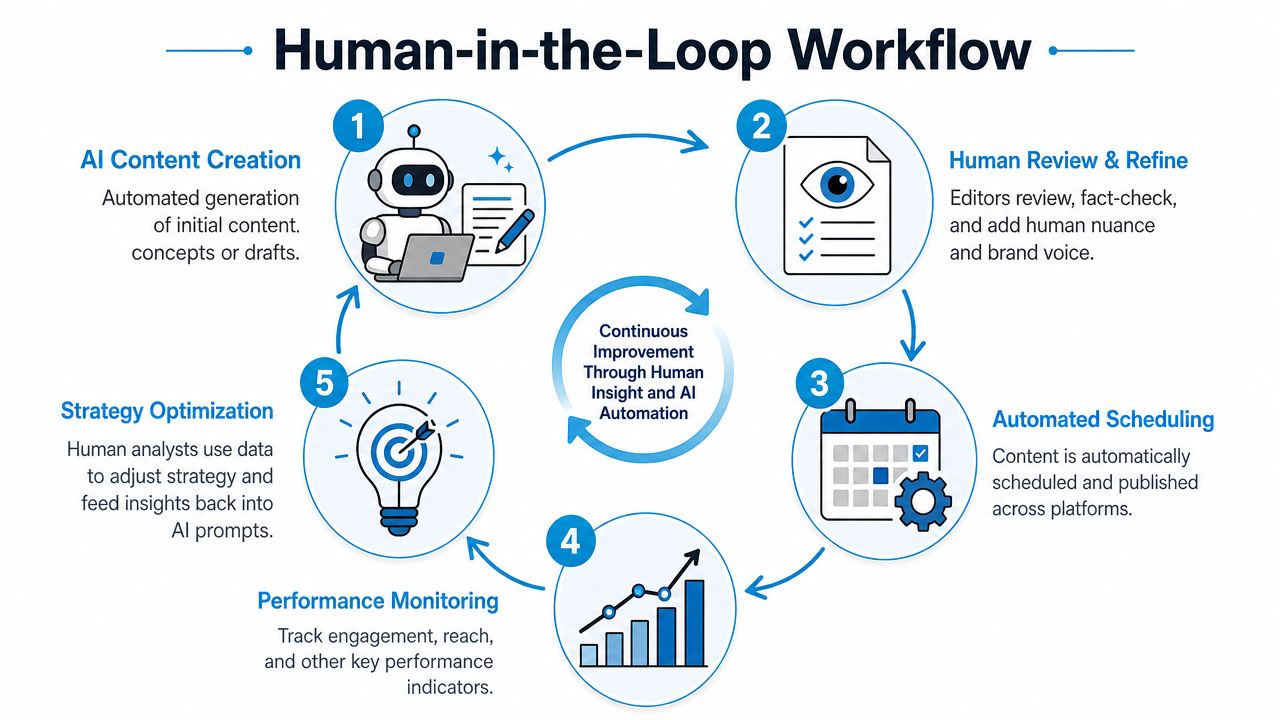
That distinction matters because the biggest risk in automating social media isn't technical failure. It's publishing something that was never reviewed by the right person. A practical human-in-the-loop system keeps software handling movement and timing while people handle judgment and accountability.
Build the workflow around decisions
The simplest version looks like this:
Topic input
Content ideas come from campaigns, product priorities, customer questions, and performance data.Draft generation
AI can help structure posts, summarize source material, suggest variants, or repurpose approved messaging.Human refinement
A marketer or editor rewrites for clarity, brand fit, platform context, and relevance.Approval routing
The system sends the post to the right approver based on content type and risk.Scheduling and monitoring
Approved content gets published automatically. Metrics and alerts feed back into the review cycle.
That's the operating logic behind a more resilient content process. If you're evaluating how AI fits into production, this guide to choosing the right AI tools for your content workflow is useful because tool choice should follow process design, not the other way around.
Use approval paths based on risk
Not every post needs the same level of scrutiny. That's one of the clearest places automation helps.
A documented workflow can route content based on sensitivity. According to Stepper's guide to social media automation, a step-by-step methodology involves creating a human-in-the-loop system where automation triggers approval stages based on content sensitivity. Routine posts may require one approval, while product announcements may require marketing manager, product team, and executive review.
Here's what that looks like in practice:
| Content type | Suggested review path | Why it matters |
|---|---|---|
| Routine evergreen post | One marketing approver | Low risk, high frequency |
| Promotional campaign post | Marketing plus campaign owner | Message and offer must align |
| Product update | Marketing, product, leadership | Accuracy and positioning matter |
| Sensitive issue or public response | Marketing, PR, legal if needed | Brand and compliance risk are higher |
Later in the workflow, reporting can also be automated. In this context, a short explainer is useful before the embedded example below.
A simple workflow example
Say a company wants to promote a webinar every week.
The automation system can trigger every Monday morning, pull the approved webinar details, generate a first-pass post for LinkedIn and Facebook, and add draft entries to a content calendar. A marketer reviews each version, adjusts the hook, adds platform-specific language, and checks that the CTA still matches the landing page. Once approved, the scheduler publishes the posts on preset dates.
The same system can also pull impressions and engagement into a shared dashboard daily or weekly so the team can compare performance over time. If engagement drops sharply, the workflow can flag the issue for review instead of repeating the same underperforming pattern.
Build your SOP so automation moves work forward, but a person still owns every final decision that affects brand, accuracy, or reputation.
That's the core of a human-in-the-loop model. It scales output without pretending software can replace editorial judgment.
AI Content Production Without Sounding Like a Robot
A business owner sets up AI, generates a month of posts in an hour, and feels efficient. Two weeks later, the feed sounds polished but flat. The wording is clean, the posts are on schedule, and none of them sound like the company.
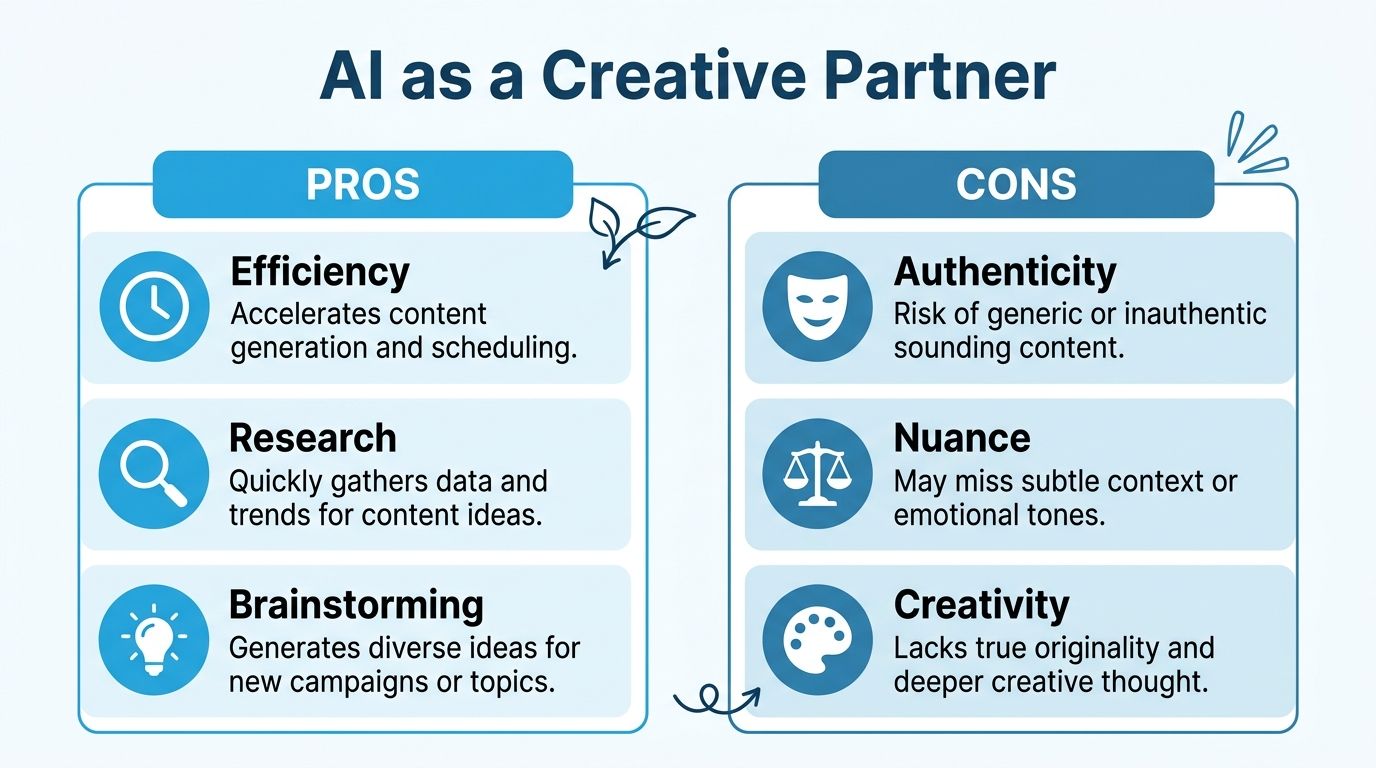
That failure usually starts with the wrong job description for AI. Use it to speed up draft creation, angle generation, and repurposing. Keep strategy, judgment, and brand voice with a person. A YouTube discussion on AI-created content and authenticity highlights a simple point: audiences are quick to question content that feels machine-made, especially when it lacks a clear opinion or lived experience.
Use AI as a first-draft assistant
AI does its best work at the messy middle of content production. It can help turn raw material into workable options faster than a marketer starting from scratch.
Use it for:
- Summarizing inputs: Turn a webinar outline, product release, or blog post into draft social angles.
- Generating options: Create several hooks, CTA variants, or post structures.
- Repurposing approved content: Adapt one idea into formats for LinkedIn, X, or Facebook.
- Organizing ideas: Group audience pain points, objections, and themes into content buckets.
The trade-off is straightforward. Speed goes up. Originality does not go up on its own.
Publishing first-pass output with light edits is what makes brands sound interchangeable. If you're comparing platforms and assistants, this roundup of top AI marketing tools for 2026 can help you evaluate what supports ideation and workflow without overpromising originality.
Train the system with your real content
AI reflects the quality of the material you feed it. If the inputs are generic, the output will be generic in a brand-safe tone.
Powtoon's guide to automating social content with AI notes that historical examples help AI reflect a brand's voice and style more accurately. In practice, that means giving the system source material it can learn from:
- High-performing posts: Focus on posts that sounded like your brand, not just posts that got clicks.
- Approved messaging: Product language, positioning statements, and recurring customer objections.
- Writing constraints: Sentence length, tone boundaries, banned phrases, and preferred CTA style.
I've seen teams blame the tool when the underlying issue was thin input. A model cannot infer a sharp point of view from bland source material.
Add human proof points before anything goes live
The final pass should come from a person with context. That person adds what AI usually cannot supply with any real conviction:
- A real opinion: A clear stance on an industry issue, customer behavior, or common mistake.
- A useful observation: Something your team keeps hearing in sales calls, client work, or service delivery.
- A lived example: A specific lesson from recent work, internal testing, or execution.
- A sharp hook: A line tied to your point of view, not a recycled content pattern.
A generic draft might say consistency matters on social media. A marketer with context can turn that into something sharper: “Inconsistent social media programs usually do not have a creativity problem. They have an approval problem.”
That detail gives the post shape and credibility. For a closer look at prompt-based visual and written workflows, this article on generative AI social creatives is a useful companion.
AI is good at producing language. Your team is responsible for producing perspective.
That line keeps the workflow honest. The system handles volume and speed. Your team protects relevance, accuracy, and the brand voice people chose to follow.
Common Pitfalls and How to Avoid Them
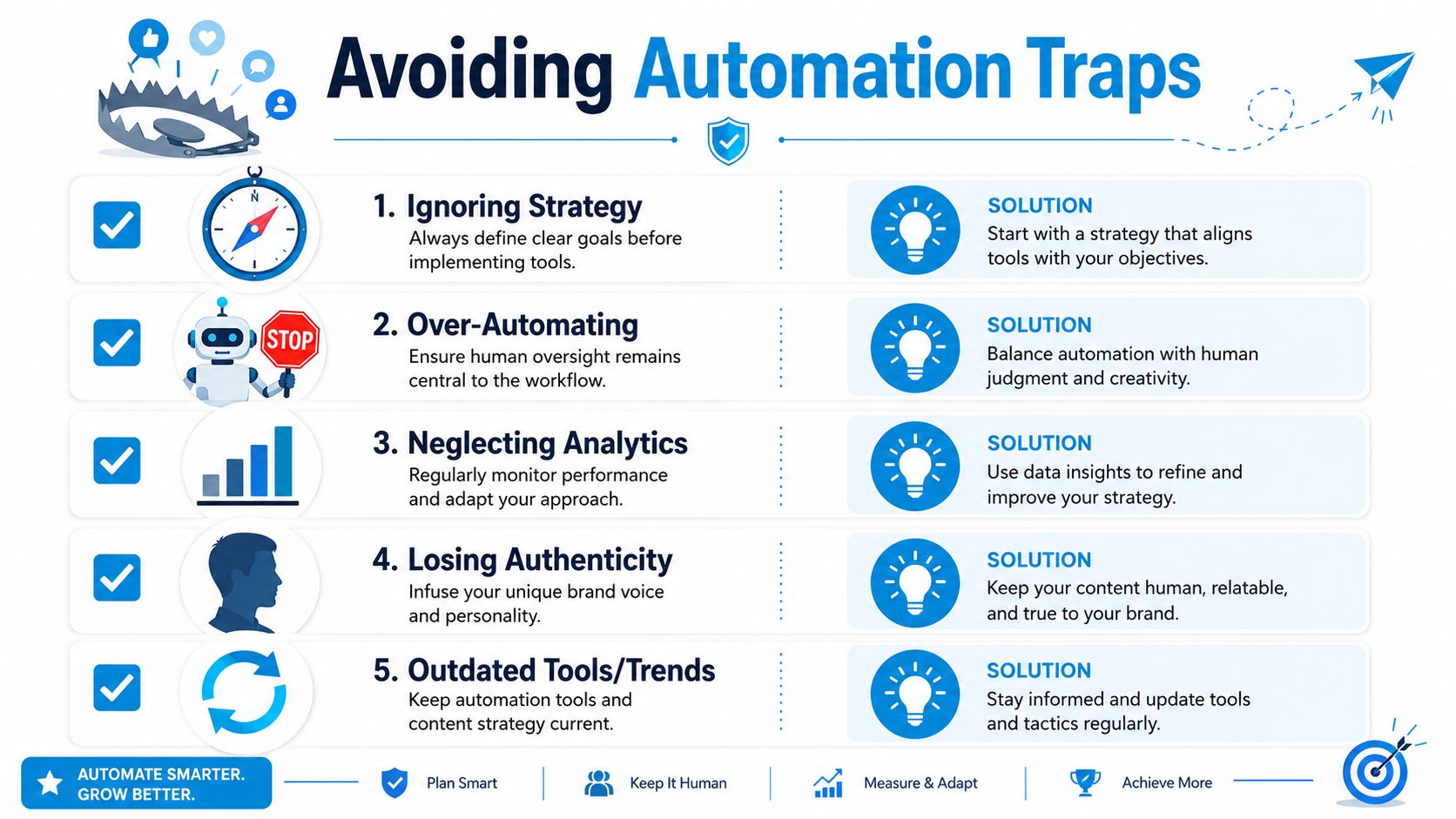
A common first failure looks like this. Posts are scheduled a month out, every platform gets the same caption, inbox notifications are buried, and nobody checks the system until performance slips. The software did its job. The operating model did not.
Automation works best when it reduces manual effort in repeatable tasks and keeps judgment with the team. That is the difference between a system that saves time and one that slowly weakens relevance, trust, and brand voice.
The cross-posting trap
Cross-posting becomes a problem when it removes context. A founder insight that works on LinkedIn may need a stronger visual frame on Instagram and a simpler, more direct setup on Facebook. Publishing identical copy everywhere saves a few minutes up front, then costs attention on the back end.
Mixpost's social media automation guide points to two useful safeguards here: avoid posting the same content unchanged across platforms, and keep the mix balanced with the 5-3-2 rule. For every ten posts, five should be relevant curated content, three should be original non-promotional content, and two should be personal or humanizing. That balance helps teams avoid the machine-like pattern of constant self-promotion.
Use adaptation rules instead of rewriting everything from scratch:
| Platform behavior | What to avoid | Better move |
|---|---|---|
| LinkedIn favors professional context | Copying an Instagram caption verbatim | Lead with a lesson, point of view, or business implication |
| Instagram depends on visual fit | Posting text-heavy updates without adaptation | Build the post around the image, reel, or carousel |
| Facebook often rewards familiarity and clarity | Publishing abstract thought-leadership copy only | Use direct benefits, community language, and clear hooks |
The goal is control, not volume.
The wrong kind of automation
Publishing can be automated. Conversation handling should stay human.
That line matters because social media is not only a distribution channel. It is also a service channel, a sales signal, and a trust signal. An automatic reply to a shipping complaint or pricing objection may be fast, but it usually sounds detached, and detached responses create more cleanup work later.
A safer setup uses automation to support the team behind the account:
- Flag unhandled mentions: Set alerts for comments, tags, and direct messages that need a response.
- Route messages internally: Send product questions to product, service issues to support, and partnership requests to the right decision-maker.
- Create response templates: Give the team approved starting points, then let a person tailor the final reply.
That human review step protects tone and judgment. It also prevents the awkward moment where a brand posts polished content while missing a frustrated customer in the comments.
The set-it-and-forget-it problem
A scheduled calendar can create the illusion of control. In practice, any automation system drifts without review.
Offers change. Priorities change. Audience response changes. If the workflow keeps publishing last quarter's assumptions, efficiency turns into waste. I have seen teams keep a full queue running while the campaign goal had already changed. The system looked organized. The output was off-strategy.
Reporting is what keeps automation accountable. Rival IQ's guide to automating social media reports explains how automated reporting can pull network data into recurring summaries, which helps teams review performance without building every report by hand.
A practical review cadence looks like this:
- Weekly checks: Catch broken links, missed approvals, off-brand posts, or comments that need attention.
- Monthly review: Compare themes, formats, and publishing times to see what is earning real response.
- Quarterly reset: Revisit approval paths, platform priorities, automations, and reporting to make sure the system still matches the business.
Good automation stays under supervision. The system handles repetition. Your team keeps the strategy, voice, and decisions in the loop.
Scaling Your Social Media Automation Strategy
Once the basics work, the next challenge is scale without chaos.
That usually doesn't mean buying more software right away. It means tightening the operating model first. Review the workflow, clean up approvals, improve naming conventions, refine prompts, and make sure reporting still connects back to business decisions. Scale should follow control.
Review the system quarterly
Quarterly review is the right cadence for strategic adjustments because it's long enough to reveal patterns and short enough to catch drift.
Look at three areas:
- Performance: Which post types, offers, and formats are producing the strongest business signal?
- Workflow health: Where are delays happening? Drafting, approvals, asset production, or reporting?
- Relevance: Are your channel priorities, message themes, and publishing cadence still aligned with the business?
This doesn't need to be a major audit deck. A clear review document and a decision list are usually enough.
Know when to scale the stack
The market signal around this category is strong. The global market for social media automation tools was valued at USD 4.5 billion in 2024 and is projected to reach USD 12.8 billion by 2033, with a projected 12.8% CAGR, according to Templated's social media automation market summary. That projection doesn't mean every business needs enterprise software. It does show that automating social media is now treated as an operational investment, not a niche experiment.
Scale your system when one of these becomes true:
| Signal | What it usually means |
|---|---|
| Teams are duplicating data manually | It may be time to connect social reporting with CRM or campaign systems |
| Approval chains are slowing launches | You likely need clearer roles and better routing logic |
| Content volume is rising across channels | A shared calendar and formal SOP become necessary |
| Leadership wants clearer impact reporting | Cross-platform dashboards need to be more standardized |
Keep the model human as complexity grows
As social programs mature, the temptation is to automate more and review less. That's usually the wrong move.
A better model is expanded automation around a stable human core. Let systems collect data, schedule content, trigger approvals, and surface exceptions. Keep people responsible for brand direction, final editorial judgment, and public interaction.
That's especially important when your business adds more campaigns, more stakeholders, or more channels. Complexity increases risk. Human oversight becomes more valuable, not less.
Use this playbook to audit your current process. Identify one manual bottleneck, one quality risk, and one reporting gap. Then fix those first. That's how a workable automation system starts.
If your team needs help building a practical social media workflow without adding full-time headcount, SharedTEAMS can help you evaluate your current process, document brand standards, and set up a human-in-the-loop marketing system that supports strategy, execution, and reporting. It's a useful next step if you want expert oversight with flexible production support instead of a traditional agency retainer.