You're probably doing what most business owners do when a new website moves from “someday” to “we need this now.” You open a few website price calculator tools, click through page count, design level, maybe ecommerce, and hope the number at the end tells you what this project should cost.
That's useful. It's also incomplete.
A website price calculator can help you set a baseline budget and avoid walking into sales conversations blind. But most calculators still reflect older agency pricing logic. They estimate scope reasonably well, yet they often miss how modern teams deliver work, especially on-demand and fractional models that can move faster and price differently. If you treat the calculator as the answer, you'll make a weaker decision. If you treat it as a planning tool, you'll make a better investment.
Table of Contents
- What Is a Website Price Calculator
- How Website Price Calculators Generate Estimates
- Common Website Pricing Ranges in 2026
- The Hidden Gaps What Most Calculators Miss
- Choosing Your Path DIY, Fixed-Project, or Fractional Team
- From Estimate to Investment Moving Forward
What Is a Website Price Calculator
A website price calculator is an interactive estimating tool that gives you a rough cost range for a web design or development project. You answer a series of questions, usually around page count, design complexity, functionality, content, and integrations, and the tool returns a projected budget.
That's the good part. It forces you to think in scope, not just in vague goals like “we need a better site.”
Most owners start with the wrong question. They ask, “How much does a website cost?” The better question is, “What are we building?” A calculator helps you break that down into pieces. It gives structure to something that often feels abstract.
What a calculator is actually useful for
Use one to get clarity on the big cost drivers:
- Page volume: More pages usually means more design, development, QA, and content work.
- Design level: A template-based site and a custom design don't belong in the same budget conversation.
- Feature depth: A brochure site is one thing. Ecommerce, user accounts, gated content, or custom databases are another.
- Content needs: Copywriting, image sourcing, migration, and SEO setup add real cost.
- Platform and integrations: CMS setup, CRM connections, analytics, and forms all affect build complexity.
A calculator is best used early, when you're trying to set a realistic range and compare options. It's not a final quote, and it shouldn't be treated like one.
Practical rule: If a calculator gives you a number before it asks about content, integrations, or post-launch needs, assume the estimate is directionally useful but strategically thin.
If you want a faster way to test scope assumptions before talking to providers, a website project estimate tool can help frame the conversation. Just don't confuse a planning number with a full scoping process.
How Website Price Calculators Generate Estimates
You open a calculator, click “ecommerce,” add a blog, check SEO, and the estimate jumps by tens of thousands. That jump usually surprises business owners. It should not.
Most website price calculators follow an old agency pricing logic. They translate your selections into hours, roles, and production steps, then stack those costs into a rough total. That makes them useful for a baseline. It also makes them limited, because many calculators still assume you are buying a traditional agency project instead of a more flexible delivery model.
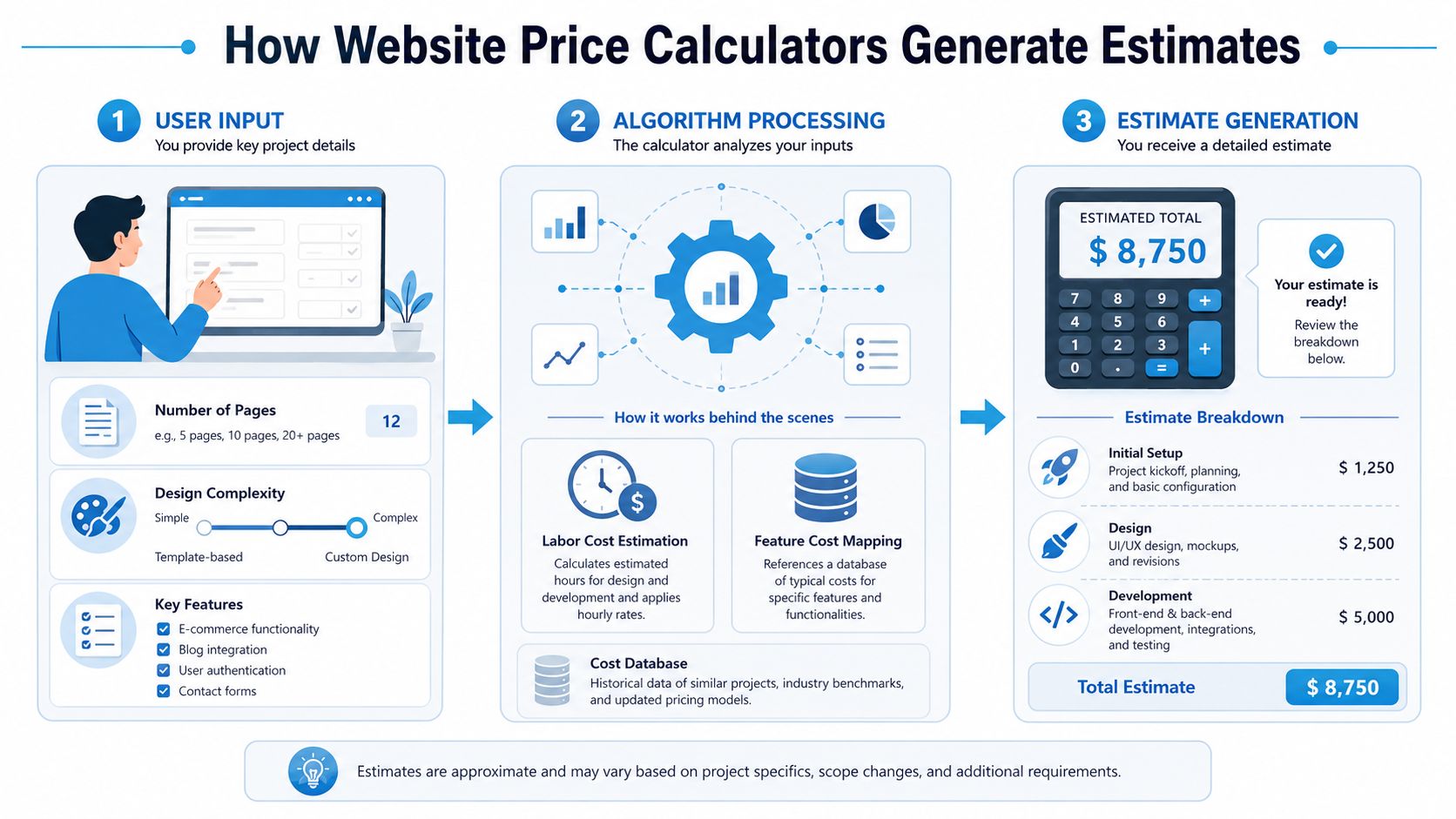
What the calculator is doing behind the scenes
At a practical level, the tool is pricing scope by category. It starts with a base website type, then increases the estimate as you add complexity.
Here are the inputs that usually drive the number:
| Input | What it affects | Why it changes the estimate |
|---|---|---|
| Page count | Design, development, QA, content entry | More pages mean more layouts, more content handling, and more review time |
| Design complexity | Creative direction, revisions, front-end work | Template customization costs less than a custom visual system |
| CMS requirements | Admin setup, templates, publishing workflow | Editing a few pages is simple. Managing structured content across teams is not |
| Feature set | Functional scope and testing | Ecommerce, memberships, search, booking, and databases add build and QA time |
| SEO scope | Research, metadata, page-level optimization | SEO work often sits outside the base build and gets priced separately |
Some calculators are little more than a page counter with add-ons. Better ones try to price the project the way an agency would price it internally. Chatter Buzz explains that range clearly in its web design pricing calculator benchmarks, with basic website design at $1,000 to $20,000 for 1 to 10 pages, custom design projects at $5,000 to $100,000+, text content at around $200 per page, CMS integration at $2,000 to $4,000 for standard systems and $10,000 to $25,000 for full development, and on-page SEO ranging from $2,000 to $10,000 depending on keyword scope.
That pricing logic is not wrong. It is just incomplete.
Why certain choices spike the estimate
A few extra pages usually raise cost in a fairly predictable way. Features do not. Once you select ecommerce, advanced filtering, account areas, custom workflows, or database-driven content, the calculator shifts from pricing a marketing site to pricing software-like behavior.
That is why the estimate can jump fast. The tool is no longer counting pages. It is counting systems, edge cases, integrations, testing paths, and long-term maintenance risk.
This matters even more for online stores. If ecommerce is part of your plan, review this guide to ecommerce website costs for founders alongside any calculator result. It gives useful context for what store owners often under-budget, especially around catalog structure, checkout requirements, and operational complexity.
Where calculators still fall short
Most calculators are built around a dated assumption. They assume the only serious option is hiring a freelancer or signing a fixed-scope agency project.
That leaves out a growing middle ground. Fractional teams, embedded specialists, and scoped production partners can price the same website very differently because they spread leadership, design, development, and content support in a more efficient way. A calculator rarely reflects that model. It usually prices the work as if every function sits inside a standard agency markup structure.
So use the estimate for what it is: a baseline built on legacy buying patterns.
If you want a better comparison point, review a full website production estimate example and compare the assumptions behind the scope, team structure, and deliverables. That exercise tells you more than the number alone.
A smart owner does not ask whether the calculator is accurate. They ask what delivery model the calculator assumes, and whether that model matches how they should buy the work.
Maintenance is another blind spot. Some calculators include it. Many bury it. A low build estimate can still lead to an expensive site if updates, security, CRO work, SEO support, and technical fixes are treated as separate retainers later.
Use the estimate to frame the conversation. Do not let it make the decision for you.
Common Website Pricing Ranges in 2026
Business owners want ranges, not theory. Fair enough. The market gives you a baseline, and you should know it before you review proposals.
According to Sayenko Design's 2026 website cost guide, the cost of building a small business website in 2026 ranges from $3,000 to $50,000+, with a typical budget often falling between $15,000 and $60,000 depending on customization and content volume. The same source places freelancers charging fixed bids at $1,500 to $6,000, reputable agencies with 2–3 staff members at $15,000 to $30,000, and veteran agency teams with 3–4 members at $25,000 to $60,000.
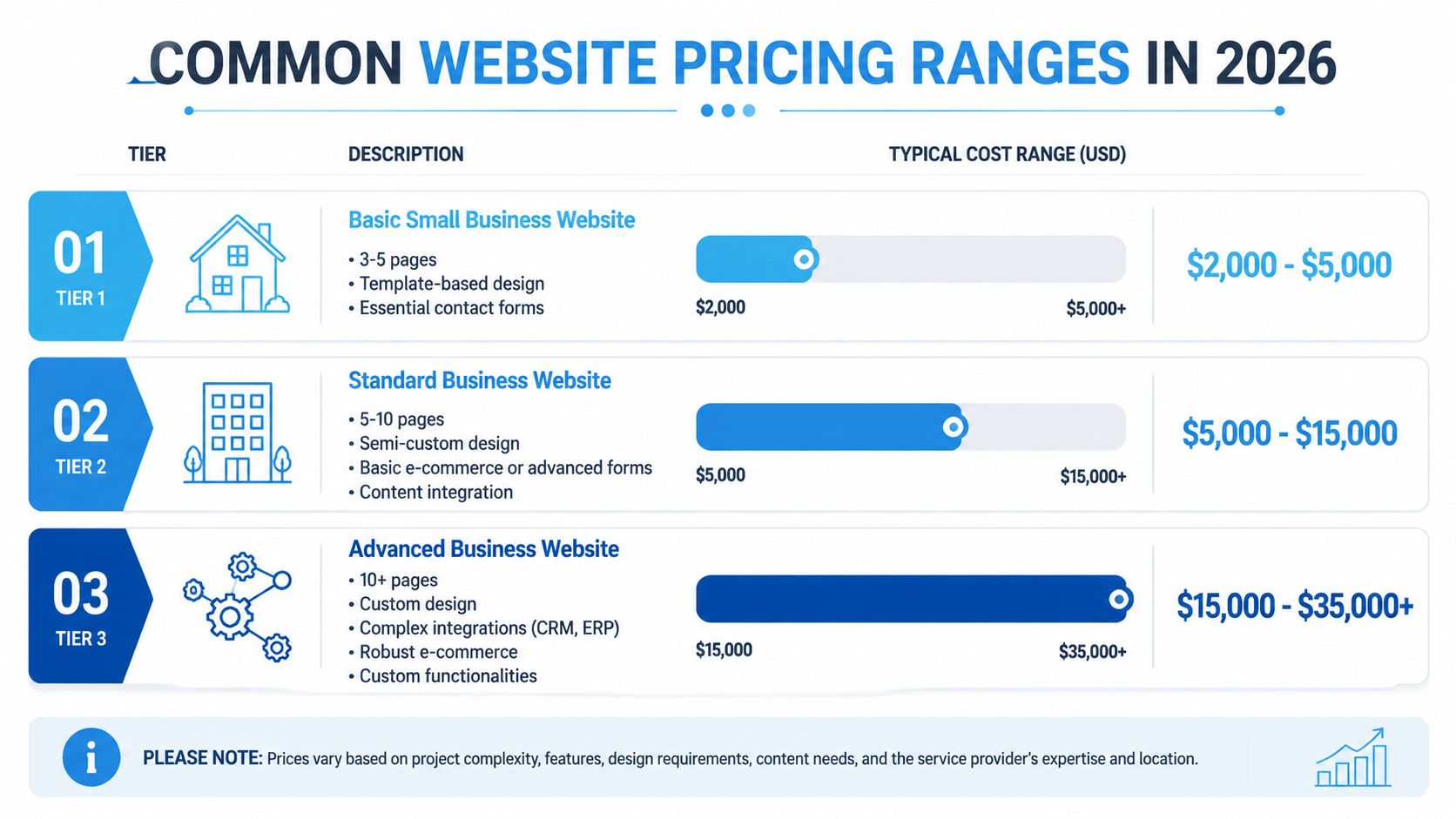
What the market ranges actually look like
Those ranges become more useful when you connect them to provider type and buying risk.
- Freelancer builds: Best when your scope is tight, your approvals are fast, and you don't need a lot of strategic guidance.
- Small agency projects: Often the middle ground for companies that want more process, more accountability, and broader capabilities.
- Veteran agency engagements: Usually make sense when complexity is high, stakeholders are many, and internal teams need structure.
Hourly rates vary too. Sayenko places individual freelancers at $50–$100/hour, freelancers or small teams at $100–$150/hour, reputable agencies at $120–$190/hour, and veteran teams at $160–$250/hour. It also makes an important point: fixed pricing often offers lower risk and better value than hourly arrangements when projects involve customization or significant content work.
Here's the part many calculators flatten too aggressively. They tend to estimate the build, but they may understate adjacent work. The same Sayenko source notes that on-page optimization for 30 keywords can cost $2,000–$4,000, and CMS integration ranges from $2,000 to $25,000 depending on complexity. Those aren't fringe extras. They often determine whether the site is useful after launch.
For founders budgeting an online store specifically, this guide to ecommerce website costs for founders is worth reading because it helps separate store requirements from brochure-site assumptions.
Where calculators start to fall behind
I push back on the market's default framing.
A lot of website calculators still assume the world is split into old categories: freelancer, small agency, large agency. That's no longer enough. Some modern delivery models combine strategic oversight with leaner production systems and don't fit neatly into those brackets. If you rely only on standard calculator outputs, you may over-budget for process overhead or under-budget for execution quality.
Decision filter: Don't ask only what the website costs. Ask what operating model your estimate assumes.
If you're comparing full-scope production options, a full website production estimate process can give you a more realistic planning view than a generic one-size-fits-all calculator.
The Hidden Gaps What Most Calculators Miss
The average website price calculator sees the visible parts of the project. It counts pages, design type, and major features. That's useful. It also misses the decisions that usually separate a smooth website launch from an expensive rebuild.
The biggest gap is that most calculators are built around traditional agency pricing models, not modern delivery methods. According to Hog the Web's pricing calculator commentary, calculators often force users into rigid choices like custom versus template while missing newer on-demand models. That matters because AI-enabled fractional teams can reduce production hours by 40-60%, start projects in about 3 days instead of 3-6 weeks for an agency, and a website built this way could cost 30-40% less than a traditional agency quote for the same output.
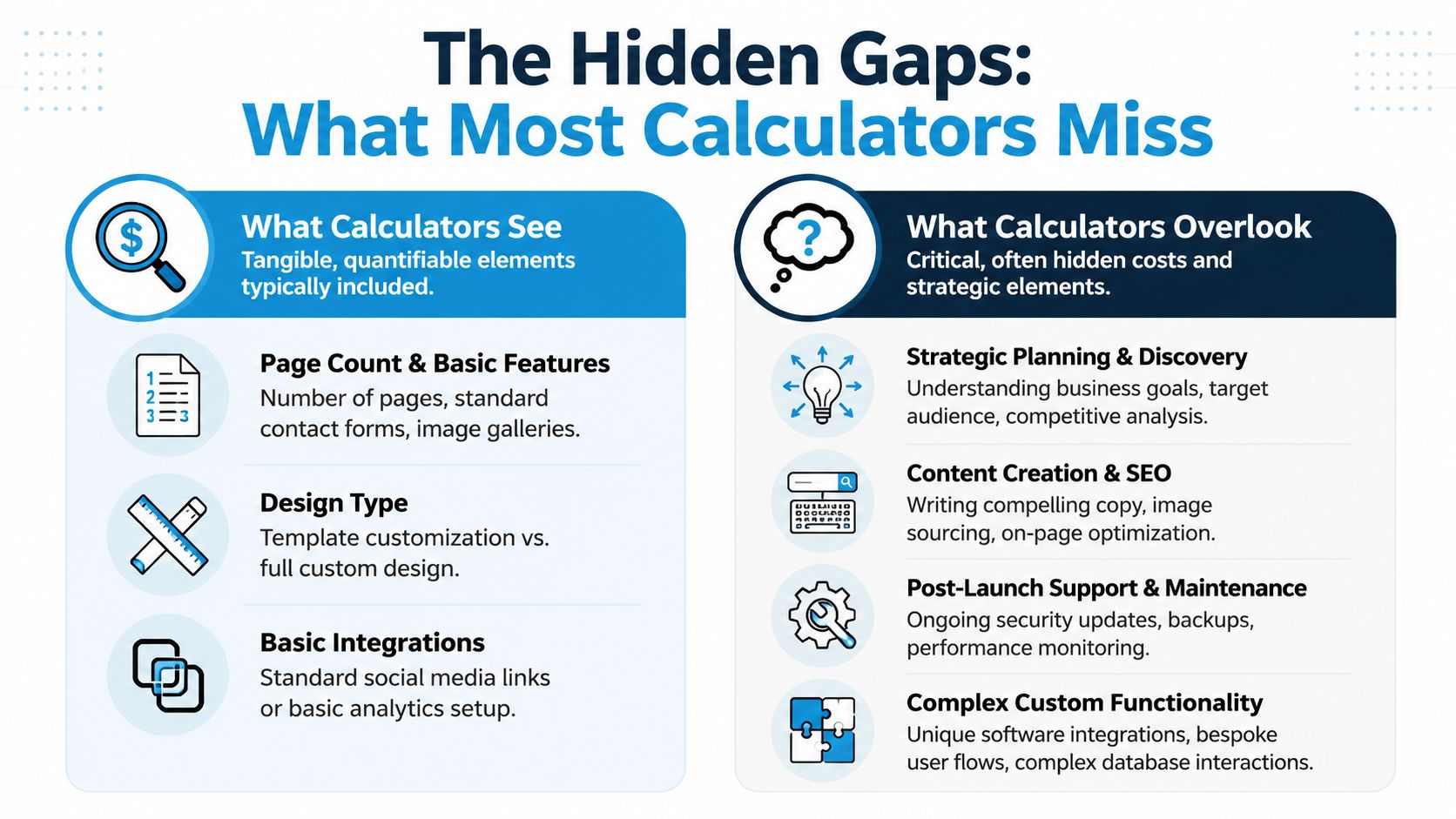
What the tool captures versus what the project needs
Calculators usually account for production inputs. They often ignore strategic inputs.
Here's the difference:
| What calculators usually see | What they often miss |
|---|---|
| Page count | Discovery and decision-making |
| Template versus custom | Messaging and content quality |
| Basic integrations | Workflow design and internal adoption |
| Feature checkboxes | Revision cycles and stakeholder complexity |
| Launch estimate | Post-launch iteration and support |
That blind spot creates bad comparisons. A cheap estimate can look attractive right up until your team realizes nobody budgeted for copy, SEO setup, redirects, migration cleanup, analytics planning, or post-launch fixes.
The estimate isn't wrong. It's incomplete.
A better way to compare your options
If you're evaluating paths, compare the engagement model, not just the quoted number.
DIY works when the site is simple and you're comfortable trading money for your own time. It rarely works well when positioning, lead flow, or internal workflows matter.
Fixed-project builds work when the scope is stable. You define deliverables, approve a quote, and move through a linear process. This is still a solid option for many businesses.
Fractional teams make the most sense when your website isn't an isolated asset. If the build connects to paid media, SEO, CRM workflows, landing pages, or ongoing experimentation, a more flexible operating model can be stronger than a one-time production contract.
The reason isn't just speed. It's alignment. Fractional marketing engagements generate the highest ROI for B2B companies with annual revenue between $2M and $50M, according to Geisheker's analysis of fractional marketing leadership. That's the band where companies often need more than founder-led marketing but don't want the cost structure of a full executive hire.
For those businesses, a calculator based only on agency templates misses the actual comparison. The question isn't “What does a website cost?” It's “Which delivery model gives us the best combination of speed, capability, and decision support?”
Choosing Your Path DIY, Fixed-Project, or Fractional Team
At this point, the website price calculator has done its job. It gave you a starting range. Now you need to choose the right build path.
Start with this comparison visual, then apply it to your situation.
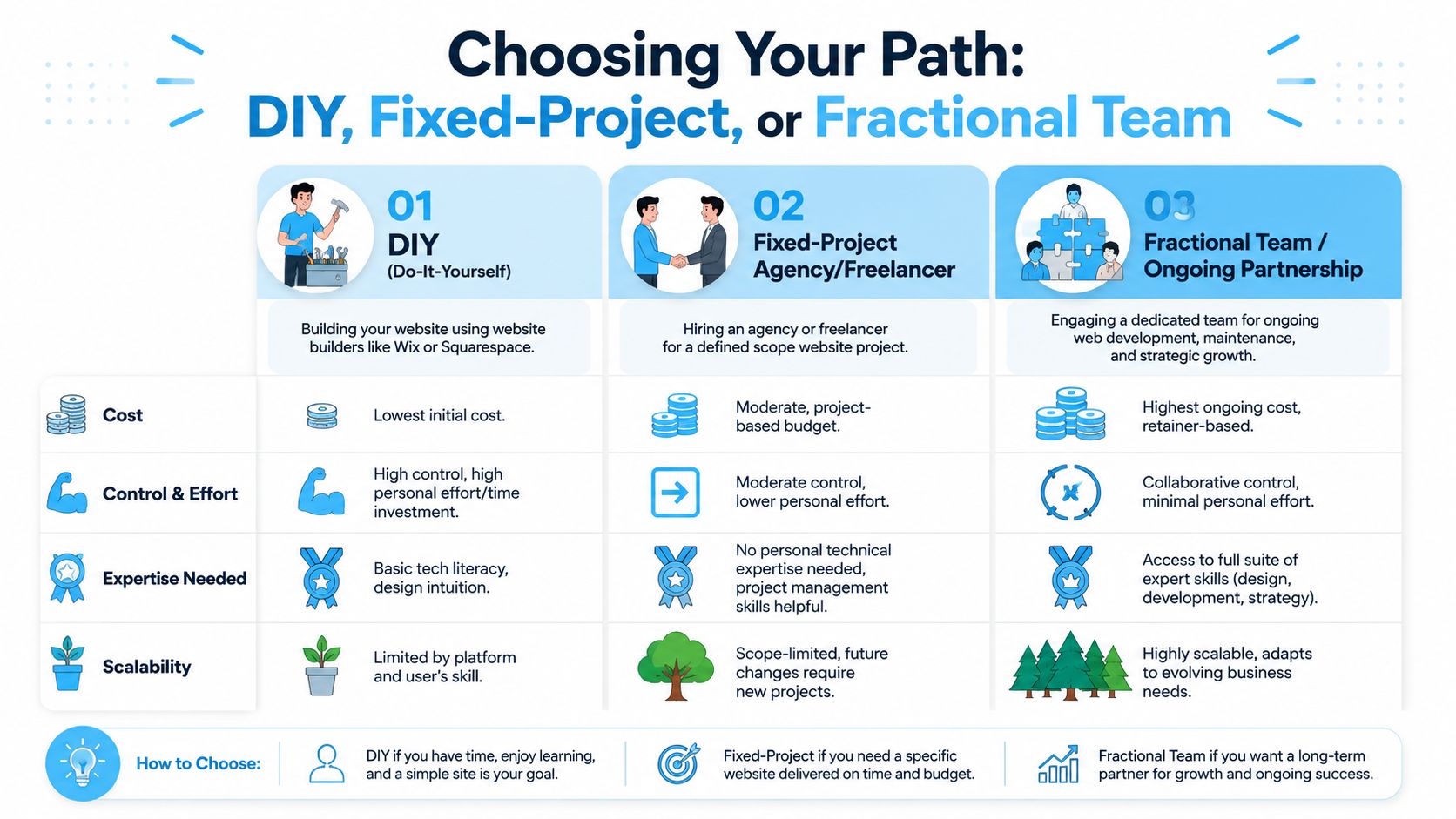
When DIY makes sense
DIY platforms like Wix and Squarespace are reasonable if your needs are basic and speed matters more than differentiation.
Choose DIY if:
- Your site is simple: A handful of pages, basic forms, and no custom workflows.
- You can write and edit content yourself: Most DIY failures are content failures, not platform failures.
- You're comfortable owning setup: That includes structure, imagery, mobile layout, and ongoing edits.
DIY becomes a bad decision when the site needs to support lead generation, sales conversations, recruiting, investor credibility, or campaign landing pages. If the website affects revenue, don't pretend your time is free.
A practical comparison for that tradeoff is this DIY website vs hiring designer breakdown, which helps clarify when builder convenience stops being a cost saver.
When a fixed-project build is the right call
This is the default for good reason. A fixed-project engagement works well when your requirements are clear, your decision-makers are available, and the end state is defined.
This route is strongest when:
- You know what you need built. Not every page, but the business purpose is clear.
- Your timeline is finite. You need a launch, not an open-ended working relationship.
- You can contain scope. Once “maybe we also need” starts taking over, fixed projects get messy fast.
If you choose this route, ask for a proposal that separates design, development, content, SEO setup, integrations, QA, and post-launch support. A lump-sum number with vague wording is how budget surprises happen.
When a fractional team is the smarter model
A fractional model fits companies that need a website, but also need decision support before and after launch. That usually means growth-stage businesses, multi-service firms, and B2B organizations where the site supports broader marketing execution.
This embedded video gives a useful high-level perspective on how businesses think about team models and outsourced support.
This path is especially worth considering when the website connects to ongoing marketing work, because your need isn't just a build. You need prioritization, iteration, and coordinated execution.
There's also a hiring angle many owners underestimate. According to Digital Applied's 2026 fractional CMO decision matrix, fractional CMOs cost approximately 40–65% less than full-time hires in Year 1, with full-time all-in costs ranging from $480K–$615K versus $60K–$180K for a fractional engagement, and can start in 1–2 weeks instead of 3–6 months. That's leadership context rather than website pricing, but it points to the same business reality: flexible expert access often beats fixed overhead when needs are substantial but not constant.
“Get the quote only after you define the decisions the provider will help you make. Otherwise you're pricing labor without pricing judgment.”
If you want an accurate quote from any provider, don't just fill out a calculator. Do these five things first:
- Write the business goal. Lead generation, sales enablement, hiring, ecommerce, or repositioning.
- List required functionality. Forms, CMS, ecommerce, gated content, integrations, user roles.
- Define content ownership. Who writes copy, who supplies images, who approves messaging.
- Flag technical dependencies. CRM, analytics, existing site migration, redirects, compliance needs.
- Clarify what happens after launch. Maintenance, CRO updates, SEO work, landing page expansion.
That checklist gets you closer to a real investment decision than any calculator alone.
From Estimate to Investment Moving Forward
A website price calculator is useful because it gives you orientation. It tells you whether you're looking at a small brochure build, a more involved business website, or something that belongs in a much larger budget category.
But calculators don't buy outcomes. Teams do.
The smart move is to use the estimate as a baseline, then evaluate how the work will get done. Look at scope definition, strategic input, content responsibility, timeline realism, post-launch support, and whether the provider's operating model fits your business. Price matters. Value matters more.
If your next step is to move from rough estimate to real planning, review a provider's website and marketing engagement process and see how they scope work, handle collaboration, and define deliverables before you compare proposals. That's where good decisions happen.
A calculator should start the conversation. It shouldn't end it.
If you want a clearer view of what your website should cost, and how that project fits into your broader marketing priorities, SharedTEAMS can help you evaluate the scope, pressure-test the assumptions, and map out a practical next step without locking you into a long-term retainer.