Leads are filling out forms, downloading guides, opening emails, and then nothing happens for days. Someone on your team means to follow up. A spreadsheet gets updated late. A sales rep misses the context behind the lead. A prospect who was interested on Tuesday forgets you by Friday.
That's the reality in a lot of small and midsized businesses. Marketing doesn't usually fail because the team lacks ideas. It fails because the follow-up process depends on memory, inbox management, and manual effort that doesn't scale. When the same people are handling campaigns, content, sales support, reporting, and approvals, important opportunities slip through the cracks.
Marketing automation workflows solve that problem when they're built with discipline. They create repeatable systems for lead nurturing, customer communication, internal alerts, and performance tracking. They also give smaller teams a way to act bigger without adding unnecessary complexity. If you're already thinking about a more structured operating model, this kind of planning fits well with an AI-first marketing strategy that connects strategy, execution, and data.
Table of Contents
- Introduction From Manual Effort to Automated Impact
- What Are Marketing Automation Workflows and Why They Matter
- The Building Blocks Components and Required Systems
- Four Essential Workflow Examples for Any Business
- How to Measure and Optimize Workflow Performance
- Your SMB Implementation Checklist and SOP
- Conclusion Move from Manual Tasks to Strategic Growth
Introduction From Manual Effort to Automated Impact
A common pattern shows up when a business starts growing. The team builds demand successfully, but the operating process behind that demand stays manual. New contacts enter a CRM without clear segmentation. Follow-up emails go out inconsistently. Sales hears about hot leads too late. Existing customers don't get timely post-purchase communication unless someone remembers to send it.
That's expensive in ways that aren't immediately obvious to many.
The obvious cost is lost revenue from weak follow-up. The less obvious cost is what manual work does to the team. Marketers spend time copying lists, checking form fills, updating statuses, and sending one-off emails instead of improving campaigns. Sales spends time sorting through leads without enough context. Leadership sees uneven performance and assumes the issue is messaging, budget, or channel mix when the underlying problem is often process design.
Practical rule: If a repeated marketing task happens often, follows a pattern, and affects revenue or customer experience, it should probably become a workflow.
Marketing automation workflows move that repeated work into a system. A customer action triggers a sequence. The system checks rules, sends the right message, updates the record, and notifies the right person when needed. Good workflows make your marketing more consistent. Great workflows make your business easier to run.
For SMBs and fractional teams, that distinction matters. You usually don't have extra headcount to absorb inefficiency. Every workflow has to justify its existence by saving time, supporting conversion, or improving handoff quality between marketing and sales.
The goal isn't to automate everything. The goal is to automate the right things first, then build from there with enough structure that the system stays useful instead of becoming another maintenance burden.
What Are Marketing Automation Workflows and Why They Matter
A marketing automation workflow is a predefined sequence of actions that starts when a prospect or customer does something specific, or when their data meets a defined condition. That trigger could be a form submission, a page visit, a purchase, a period of inactivity, or a lead score threshold. Once the trigger fires, the system follows rules you set.
Think of it as a practical if-then engine for marketing operations. If someone downloads a pricing guide, then assign them to a relevant segment. If they open a follow-up email and visit the pricing page, then notify sales. If they don't engage, then send educational content instead of a sales push.
Why this matters beyond email scheduling
A lot of teams treat automation as “email that goes out later.” That's too narrow. Real marketing automation workflows coordinate timing, personalization, segmentation, routing, and measurement. They help smaller teams respond with consistency even when no one is sitting at a keyboard.
That operational discipline matters because the business impact is measurable. Organizations implementing marketing automation workflows achieve a 14.5% increase in sales productivity and a 12.2% reduction in marketing overhead, according to Aprimo's guide to marketing workflow automation. Those numbers matter because they tie automation to two pressures SMBs feel constantly: getting more value from existing staff and reducing waste in repetitive work.
What effective workflows actually do
The best workflows aren't flashy. They're dependable. They remove friction from common paths in the customer journey.
Here's what they typically improve:
- Lead follow-up speed by responding to behavior quickly instead of waiting for someone to notice activity.
- Message relevance by segmenting people based on what they did, what they want, and where they are in the buying journey.
- Sales handoff quality by sending context with the lead, not just the lead record.
- Team focus by taking repetitive coordination work off the daily task list.
Good automation doesn't replace judgment. It protects your team's time so they can use judgment where it matters.
Why SMBs should care now
Larger companies can hide bad process with more people. Smaller businesses can't. That's why automation often becomes a practical advantage for lean teams. A small team with tight workflows can outperform a bigger team that still relies on manual follow-up and scattered systems.
You also don't need a giant martech stack to get started. A CRM, an email platform with automation features, and analytics tied together properly are often enough to build useful workflows that support growth without turning your operation into a maintenance project.
The Building Blocks Components and Required Systems
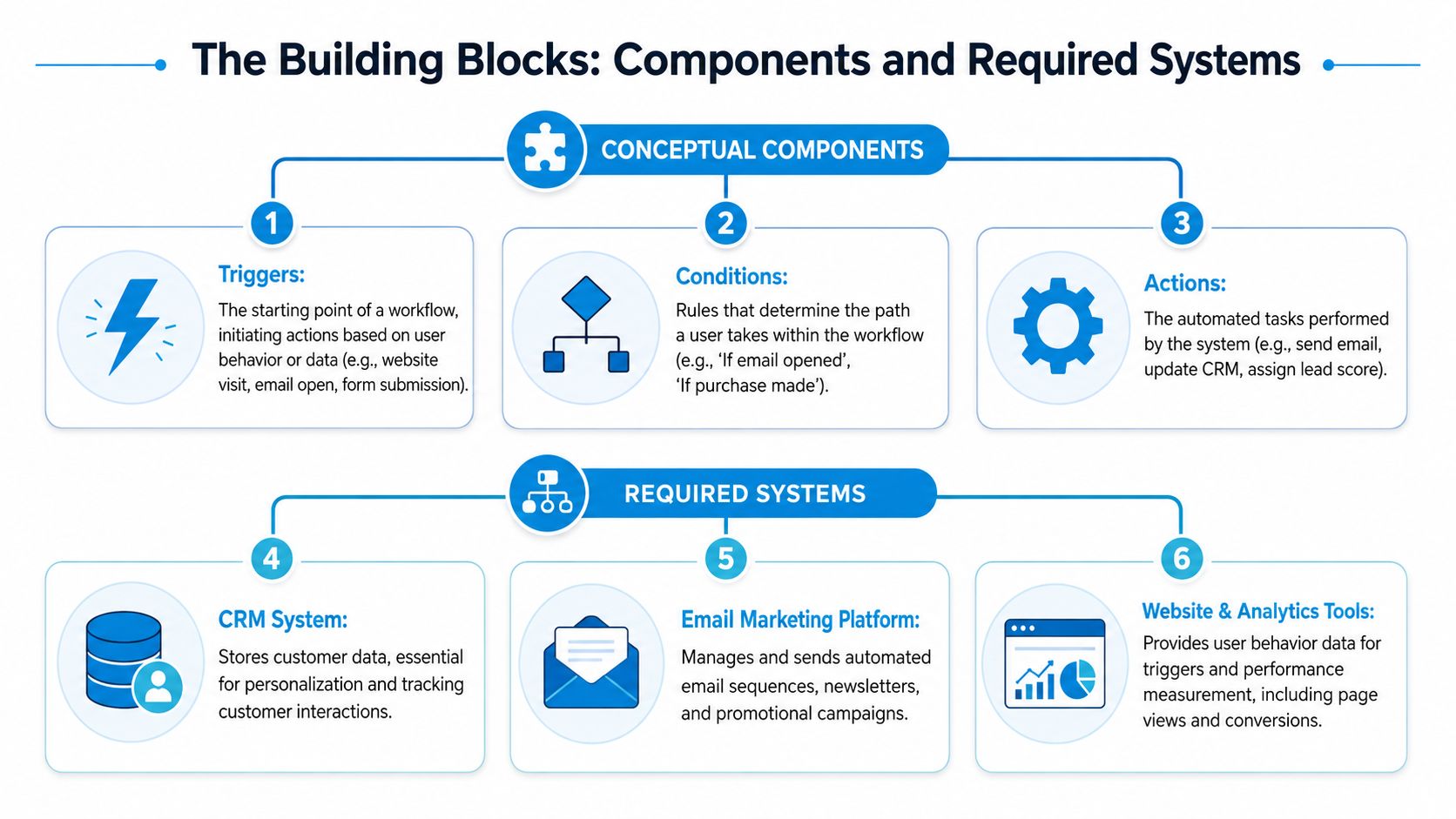
Most workflow problems start before launch. Teams jump into tools, create branches everywhere, and only later realize they never clarified the logic, ownership, or data flow. A better approach is to separate the concept from the software first.
How a workflow actually works
Every workflow has a few moving parts. Keep them simple enough that another person can understand and troubleshoot them without decoding your logic tree.
| Component | What it does | Typical example |
|---|---|---|
| Trigger | Starts the workflow | Form submitted, demo requested, purchase completed |
| Condition | Decides the path | New lead vs existing customer |
| Action | Tells the system what to do | Send email, update CRM field, assign owner |
| Delay | Controls timing | Wait one day before next message |
That structure only works if the workflow also includes the elements that make automation effective, not just functional. Effective automation workflows must include segmentation, personalization, automated delivery, analytics, and closed-loop processes, as outlined in Dapta's breakdown of essential marketing automation workflows.
Here's how those five elements show up in practice:
- Segmentation means the workflow knows who should receive what. A first-time buyer shouldn't get the same messaging as a long-term customer.
- Personalization means the message reflects behavior, need, or journey stage. This can be as simple as using a content branch based on service interest.
- Automated delivery means timing and channel are handled by the system, not a reminder in someone's task list.
- Analytics means you can see whether the workflow improves engagement, lead quality, or downstream outcomes.
- Closed-loop process means the business acts on the data. Sales feedback, unsubscribes, failed steps, and conversion outcomes all feed into revisions.
If your email efforts still feel disconnected, a stronger modern email marketing approach usually starts with those same principles.
A lot of teams also use external tools to reduce manual data handling around workflow setup, enrichment, and reporting. If you're comparing options, this guide to AI tools for data automation is a useful reference point for thinking through where AI can support operations without overcomplicating your stack.
The systems you actually need
The software requirement is usually smaller than people expect. Most SMBs don't need ten platforms. They need a few core systems that share data well.
The minimum useful stack looks like this:
- CRM for contact records, lifecycle stage, owner assignment, and sales visibility.
- Email platform with workflow automation for sequences, branches, and audience management.
- Website and analytics tools for tracking actions like form fills, page visits, and conversions.
Integration matters more than feature volume. A platform that “connects” but doesn't pass clean data between systems creates extra reconciliation work. That's how teams end up exporting CSV files and patching workflows manually.
This short walkthrough gives a useful visual sense of how workflow logic comes together in practice:
When choosing tools, favor platforms that make these tasks easier:
- Building visually so non-technical marketers can adjust logic without developer help.
- Sharing data natively so contact status, activity, and outcomes stay aligned.
- Supporting multiple channels if your team uses more than email.
- Testing continuously so subject lines, timing, and content paths can improve over time.
A workflow should make work lighter, clearer, and easier to scale. If the system adds confusion, the build isn't finished yet.
Four Essential Workflow Examples for Any Business
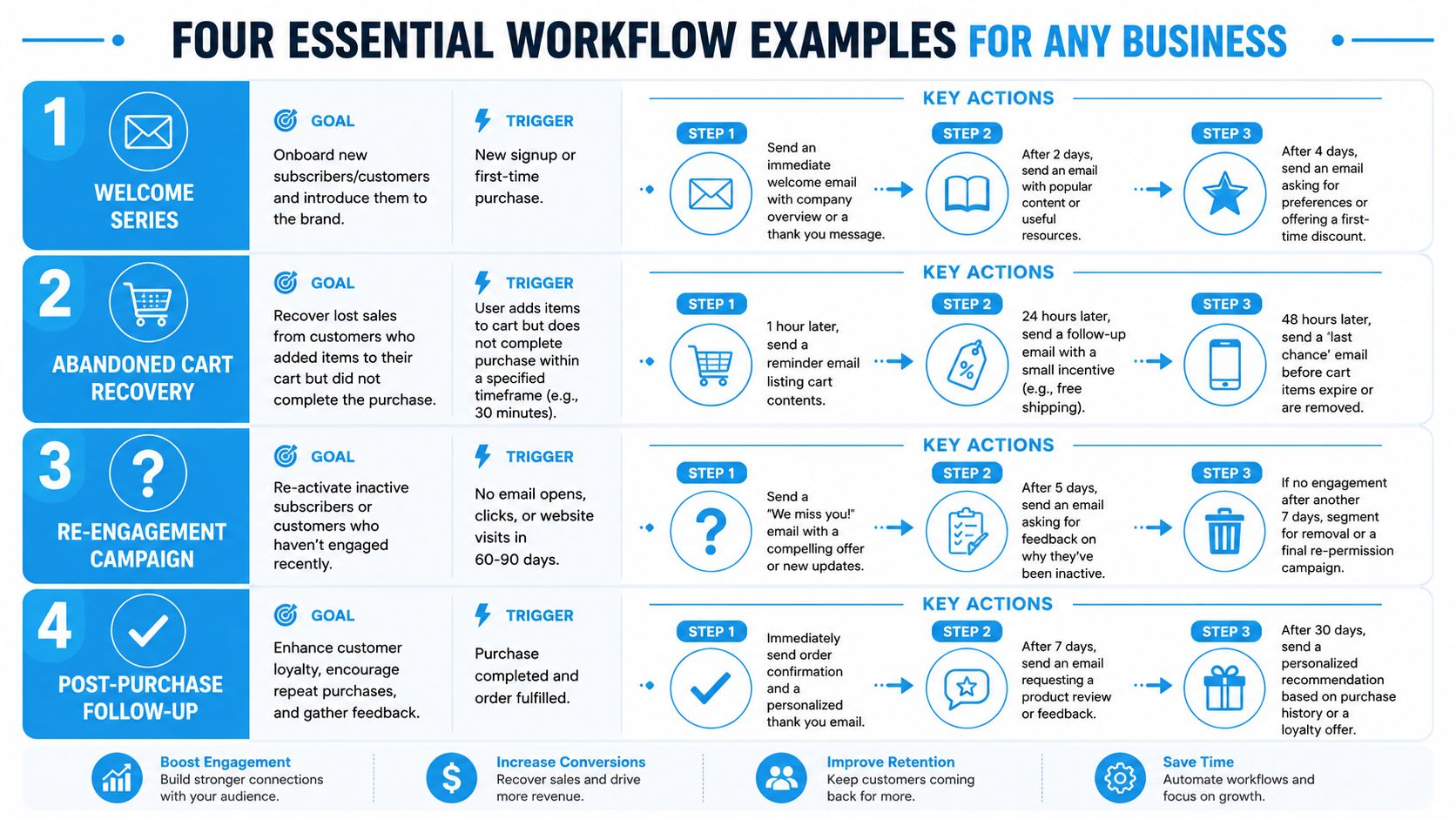
The easiest place to start is with workflows that solve recurring, high-value problems. Not every business needs the same automation map, but four workflows show up again and again because they support the moments where manual follow-up usually breaks down.
Welcome and onboarding workflow
This workflow handles the first impression after a signup, inquiry, or first purchase. It's often the most impactful place to begin because it sets expectations immediately.
A useful welcome workflow usually includes:
- Immediate response with a thank-you, confirmation, or promised resource.
- Early orientation that introduces the brand, service model, or next step.
- Preference gathering so later messaging becomes more relevant.
The mistake is making this sequence about the company instead of the customer. New contacts don't need a mini corporate biography. They need clarity. Tell them what they signed up for, what happens next, and where to go if they're ready for a deeper step.
Lead nurturing workflow
Not every lead is sales-ready after one interaction. A lead nurturing workflow gives interested prospects a structured path toward a decision without forcing a hard sell too early.
This works well when the sequence matches intent. A prospect who downloaded a tactical checklist should get educational follow-up. A prospect who viewed your pricing or service pages repeatedly may need proof points, implementation detail, or a sales conversation.
A strong nurture sequence often blends:
- Educational content tied to the original interest.
- Decision-support content such as service comparisons, process explainers, or FAQs.
- Clear handoff triggers for sales when engagement shows real buying intent.
If you're looking at broader business process design, this guide to streamlining operations with automation is helpful because it frames workflow thinking beyond just email campaigns.
Build nurture around decision friction. If buyers stall because they don't understand fit, send clarity. If they stall because they don't trust execution, send proof.
Lost opportunity re-engagement workflow
Generic automation frequently falls short. Many businesses send the same “just checking in” message to every closed-lost lead and assume they've covered re-engagement. That approach usually creates noise, not progress.
Research indicates that 45% of customers ignore generic re-engagement campaigns, and a more specific approach based on the closed-lost reason can increase conversion by 22% compared to one-size-fits-all campaigns, according to Uberflip's marketing automation workflow guidance.
That means your workflow logic should reflect why the deal was lost.
| Closed-lost reason | Better follow-up angle |
|---|---|
| Budget constraints | Lower-commitment offer, phased scope, later check-in |
| Timing | Reminder timed to buying cycle or renewal period |
| Feature mismatch | Product updates, alternative use case, future-fit content |
| Internal approval stalled | ROI support, stakeholder-specific materials |
Role-based segmentation matters here too. The champion, the influencer, and the finance approver often need different messages. If your CRM captures closed-lost reasons and contact roles, this workflow can become far more useful than the standard reactivation email.
Internal sales alert workflow
This one doesn't get enough attention, but it often delivers fast operational value. The workflow watches for high-intent actions and alerts the right person internally.
Typical triggers include:
- Pricing page visits
- Demo requests
- Return visits from an existing opportunity
- Multiple high-intent content views in a short period
The action itself can be simple. Send an email, create a task, update the CRM owner, or push a Slack notification with context. What matters is that sales gets the right signal at the right time with enough information to act intelligently.
This workflow is especially useful for fractional teams or lean internal teams because it closes the gap between marketing activity and sales follow-up without requiring a meeting every time a lead engages.
How to Measure and Optimize Workflow Performance
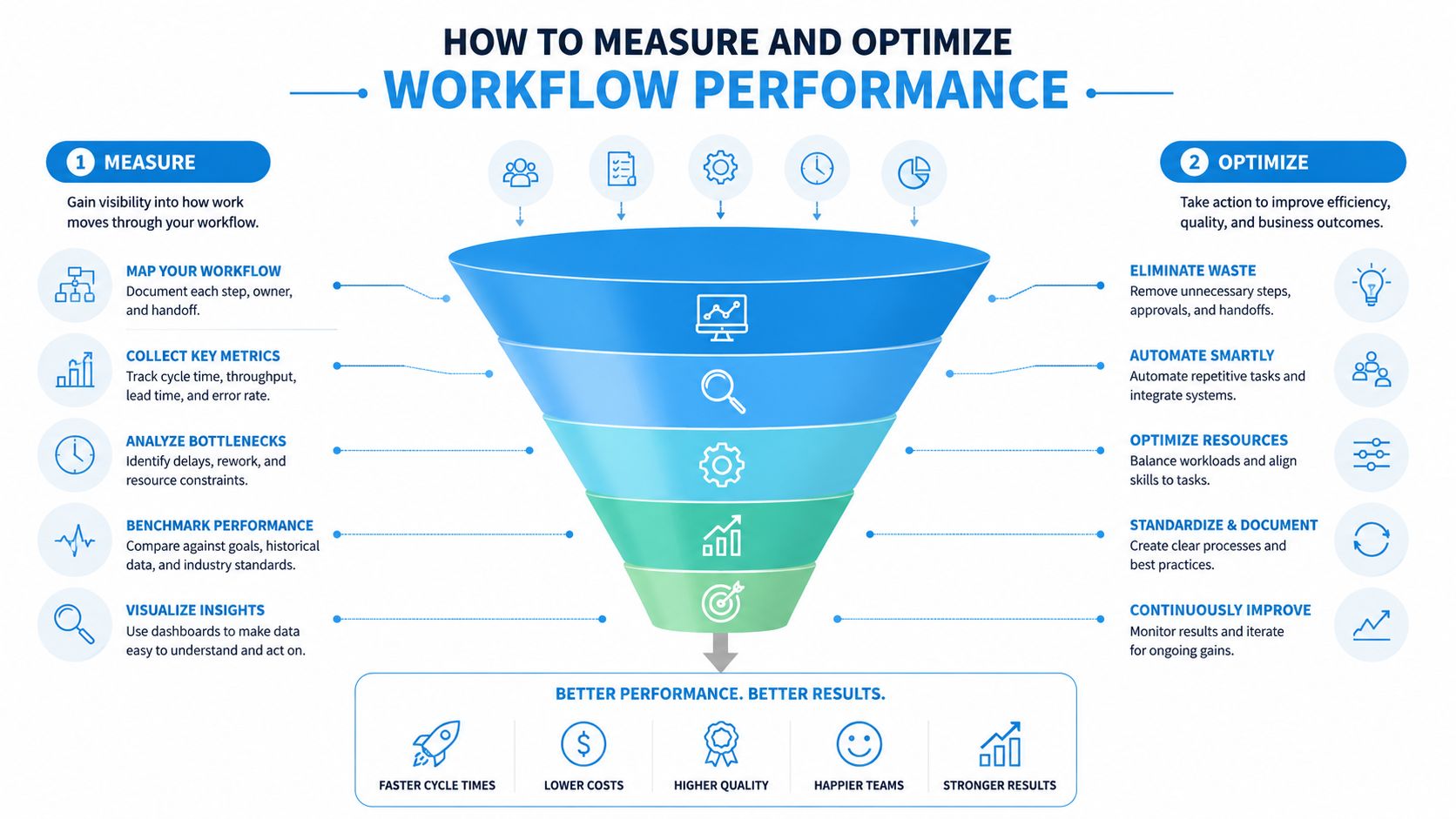
Automation isn't a set-and-forget system. A workflow that launches cleanly can still underperform if the message, timing, audience logic, or handoff criteria are off. Good teams don't just build workflows. They review them, test them, and tighten them.
Start with a baseline before you automate
Before launch, document what the manual process looks like now. Track hours spent, common failure points, and the business result you're trying to improve. That baseline gives you a real comparison point later.
A useful evaluation framework should include:
- Operational inputs such as time spent and error patterns
- Workflow health such as completion and failure points
- Business outcomes such as lead quality, form submissions, or purchase behavior
This is also where better reporting practices matter. Teams using AI analytics for ad ROI often find that the same discipline improves workflow measurement because both depend on clean attribution and stage-based performance review.
Match metrics to funnel stage
Not every workflow should be judged by the same number. Metrics need to match the job the workflow is supposed to do.
Marketing automation success requires tracking funnel-specific KPIs: top-of-funnel metrics include open rate and CTR; middle-of-funnel includes lead quality and form submissions; bottom-of-funnel includes purchase rate, CLV, and churn rate. Mapping KPIs to funnel stages ensures workflows deliver value at each point, based on Braze's KPI framework for marketing automation.
A simple perspective is:
- Top of funnel measures whether the workflow earns attention.
- Middle of funnel measures whether interest is becoming intent.
- Bottom of funnel measures whether the workflow contributes to revenue quality and retention.
If a workflow's goal is education, don't judge it like a checkout sequence. Measure it against the stage it serves.
Optimization comes from controlled testing
Once the workflow is live, test one variable at a time where possible. Subject lines, send timing, CTA wording, branch logic, and content order can all change performance. Without structured testing, teams end up rewriting whole workflows based on opinion.
A practical review cycle usually looks like this:
- Check delivery and logic first so technical errors don't distort the results.
- Review stage-specific KPIs to see where drop-off happens.
- Run focused tests on a small number of variables.
- Collect sales or customer feedback if the workflow touches qualification or retention.
- Revise the sequence based on evidence, not instinct alone.
The important point is consistency. A workflow becomes valuable over time because it gets better, not because it was perfect at launch.
Your SMB Implementation Checklist and SOP
Small teams don't need a giant automation roadmap to start. They need one workflow that solves a real problem, runs reliably, and doesn't create extra maintenance. That first win builds the discipline for everything that follows.
A practical SOP for your first workflow
Use this process before you open any workflow builder.
Define one business goal
Pick a single outcome. That might be faster lead follow-up, better onboarding, more qualified handoffs to sales, or stronger post-purchase communication. If the goal is vague, the workflow will be vague too.Choose one audience segment
Don't start with “all leads.” Start with one segment you understand well, such as new demo requests, first-time buyers, or inactive opportunities with a known closed-lost reason.Map the journey on paper first
Write down the trigger, the key decisions, the actions, and the desired end state. If you can't explain the flow in plain language, don't build it yet.List the exact triggers and actions
Be precise. “Lead shows interest” is not a trigger. “Lead submitted a consultation form” is. “Follow up” is not an action. “Send onboarding email and assign owner in CRM” is.Create the content assets before building
Draft the emails, internal alerts, landing pages, and CRM field updates first. Workflow logic gets messy when the content is still being invented during setup.Build in a test environment or controlled draft
Use internal contacts, seed lists, and test records. Check timing, merge fields, branch logic, suppression rules, and owner notifications.Launch to a small segment first
Don't roll a new workflow out to your entire database. Use a limited segment so you can catch problems without creating a bigger cleanup project.Review after launch and document changes
Record what worked, what failed, and what was updated. A workflow without documentation becomes fragile fast, especially when different people touch it later.
How to control maintenance before it controls you
This is the part most guides skip. Automation doesn't only create value. It also creates upkeep. Data shows that 60% of marketing teams struggle with workflow fragmentation, and for SMBs, too many conditional rules can degrade ROI because maintenance and optimization get buried in admin work, according to Samuel J. Woods on workflow complexity and fragmentation.
That's why every new workflow should pass a simple maintenance-to-value test.
Ask three questions:
- How often will this workflow need updating because of offers, product changes, handoff rules, or team ownership?
- Who is responsible for maintaining it when a step breaks or a business rule changes?
- What business value justifies that upkeep in time saved, follow-up consistency, or conversion support?
A practical checklist helps:
- Keep logic shallow: If a workflow needs too many branches to be useful, split it into smaller workflows.
- Name everything clearly: Use plain labels for triggers, branches, and outcomes so anyone can troubleshoot it.
- Limit dependencies: The more systems and fields required, the easier it is for one bad sync to break the workflow.
- Review quarterly: Retire workflows that no longer match the customer journey or business priorities.
The smartest first workflow is usually not the most advanced one. It's the one your team can maintain with confidence.
Conclusion Move from Manual Tasks to Strategic Growth
Marketing automation workflows work best when they're treated as operating systems, not just campaign features. They create consistency where manual follow-up tends to break down. They support better timing, stronger segmentation, cleaner sales handoffs, and a more manageable workload for lean teams.
The biggest mistake is waiting until your process is already messy before adding structure. Start earlier. Pick one repeated task that matters. Build the workflow carefully. Measure it against a clear goal. Improve it based on real behavior, not assumptions.
That's how automation becomes strategic. It doesn't remove the human side of marketing. It gives your team more room for the human work that moves the business forward, such as better messaging, sharper decisions, and stronger customer conversations.
Use the checklist above to audit one manual process in your current marketing operation. If you can identify a recurring breakdown point, you've already found a strong candidate for your first workflow.
If you want help planning or managing marketing automation workflows without building a full in-house department, SharedTEAMS provides fractional marketing support for strategy, execution, and ongoing optimization. It's a practical next step for SMBs that need expert oversight, flexible production capacity, and a more structured marketing system.