You're probably looking at a dashboard right now that shows plenty of impressions and not nearly enough clicks. Search impressions are up, ad reach looks healthy, email opens may even be respectable, but traffic isn't following. That gap is where a lot of marketing budgets leak value.
A low click-through rate usually isn't one problem. It's a symptom. Sometimes the audience is wrong. Sometimes the offer is weak. Sometimes the message is fine, but the format, timing, or placement is fighting against it. If you want to know how to improve click through rate, the fastest path isn't trying random tactics. It's diagnosing where relevance breaks down, then fixing the most impactful points first.
Table of Contents
- Why a Low Click-Through Rate Is More Than a Vanity Metric
- First Diagnose Your CTR Problem Before You Treat It
- Improve CTR in Organic Search and on Your Website
- Drive More Clicks from Your Paid Advertising Campaigns
- Boost Engagement with Compelling Email and Messaging
- Your 30-60-90 Day Plan to Increase Click-Through Rate
Why a Low Click-Through Rate Is More Than a Vanity Metric
CTR sits at the point where attention turns into action. If people see your listing, ad, or email and don't click, the market is giving you useful feedback. Your message didn't feel relevant enough, credible enough, or urgent enough to earn the next step.
That matters because CTR affects more than reporting. In paid media, weak click performance often signals poor alignment between targeting, keywords, creative, and landing pages. In organic search, it can mean you're visible but unconvincing on the results page. In email, it often means the subject line got the open, but the message body failed to move the reader.
Practical rule: Treat CTR as the first proof that your positioning works in the real world, not just in a strategy deck.
Marketing leaders sometimes dismiss CTR because it doesn't tell the full revenue story. That's true. A click isn't a sale. But no one converts from a result they never choose, an ad they ignore, or an email they skim and abandon. CTR is the bridge between visibility and intent.
A strong improvement plan starts by asking better questions:
- Where is CTR low: one channel, one campaign, one audience, or one asset?
- What is being rejected: the offer, the wording, the creative, the timing, or the audience match?
- What happens after the click: do low-quality clicks suggest misleading messaging, or do low clicks suggest weak appeal?
If you diagnose correctly, CTR optimization becomes one of the cleanest ways to improve traffic quality, ad efficiency, and content performance without rebuilding your entire marketing program.
First Diagnose Your CTR Problem Before You Treat It
A common scenario looks like this. A team sees CTR trending down, assumes the whole program is underperforming, and starts rewriting ads, emails, and page copy at once. Two weeks later, nothing meaningful improves because the issue was isolated to one audience segment, one placement, or one weak offer.
Diagnosis comes first because CTR problems rarely sit at the account level. They usually show up in a specific combination of channel, audience, message, and context.
Start with the pattern, not the average
Begin with the overall number, then break performance apart by channel. Organic search, paid search, paid social, email, SMS, referral traffic, and on-site CTAs earn clicks for different reasons. A strong branded search presence can mask weak non-brand pages. Healthy lifecycle email can make paid social look less urgent than it is.
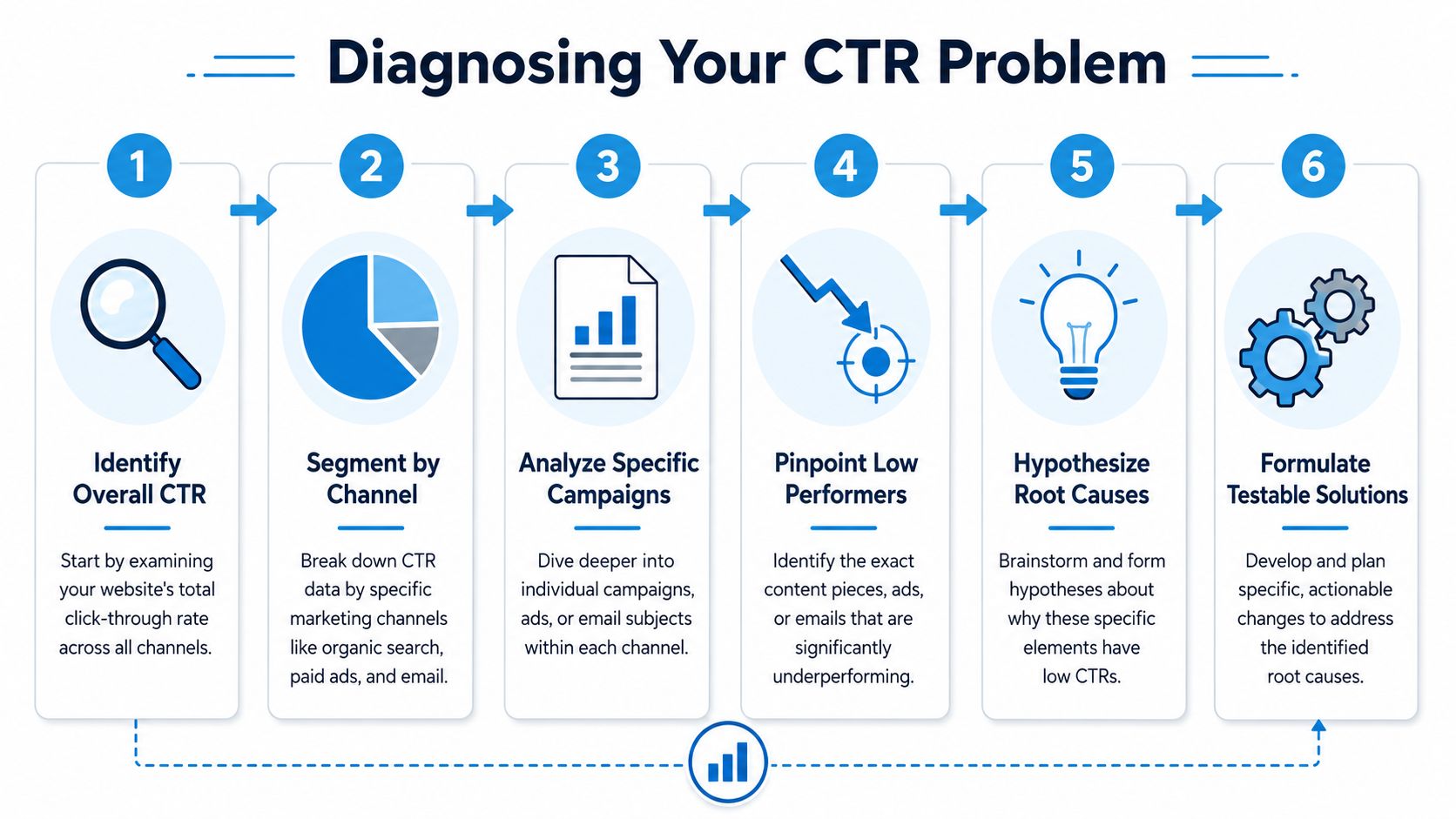
After channel review, narrow the diagnosis in three cuts:
- Campaign level for Google Ads, Meta Ads, LinkedIn, or email automations.
- Asset level for headlines, subject lines, thumbnails, CTAs, and creative variations.
- Audience level for device type, geography, intent tier, lifecycle stage, or interest cluster.
That sequence matters. If you start by rewriting creative before checking audience quality, you can improve the wrong asset. If one audience clicks and another does not, targeting or offer relevance is usually the issue. If one creative wins inside the same audience, messaging or format is usually the bottleneck.
Match the symptom to the likely cause
Low CTR tends to come from four broad problems, and each one points to a different first fix.
| Symptom | Likely Cause | First Thing to Check |
|---|---|---|
| High impressions, low clicks across one channel | Weak message-market fit | Headline, offer, audience relevance |
| One campaign underperforms while others are stable | Misaligned intent or creative | Query theme, ad copy, CTA |
| Mobile CTR trails desktop | Formatting or trust issue | Visual hierarchy, page speed, CTA placement |
| Strong opens but poor email clicks | Body content fails to carry interest | CTA visibility, segmentation, content match |
Here is the practical read on those patterns.
If Google Search Console shows strong impressions and weak clicks on pages that already rank, the page content may be fine. The problem often sits in the title tag, meta description, or search snippet framing. If your team has not tightened search intent mapping yet, this guide to smarter keyword research with AI and hidden search opportunities is a useful starting point.
If Meta campaigns struggle with broad interest audiences but retargeting performs well, relevance is probably thinning out before the click. The fix is often tighter audience construction or a more specific offer, not a full creative reset.
If email opens hold steady while clicks stay weak, the subject line did its job. The message body, CTA placement, content hierarchy, or segment match needs work.
Ask a narrower question: which audience is ignoring which message in which channel?
That framing keeps teams from treating CTR like a copywriting problem when the actual issue is targeting, offer design, or traffic quality.
Use the right tools for the right layer
Different tools answer different questions, and they should be used in order.
- Google Search Console helps identify organic pages and queries that get seen often but selected rarely.
- Google Analytics shows what happens after the click. That matters because higher CTR paired with weak engagement usually means the promise and the landing experience do not match.
- Google Ads and Meta Ads Manager help isolate performance by audience, placement, keyword group, device, and creative variation.
- Email platforms such as Mailchimp, HubSpot, or Klaviyo show subject line performance, segment differences, send-time effects, and link-level click behavior.
In practice, I look for the cheapest high-confidence fix first. Sometimes that is a title tag rewrite. Sometimes it is excluding a low-intent audience. Sometimes it is reducing CTA options on a crowded email. The point is to find the layer that is failing before you start testing everything.
For this reason, some businesses use a fractional marketing model like SharedTEAMS to combine strategy, execution, and optimization under one owner. The model matters less than accountability. Someone needs to turn channel data into a prioritized testing plan, then review results often enough to separate signal from noise.
Improve CTR in Organic Search and on Your Website
A common SEO frustration looks like this. A page climbs onto page one, impressions rise, and traffic barely moves. The ranking did its job. The listing did not.

Fix the search result before rewriting the page
Start with pages that already earn impressions and sit close enough to win more clicks. If a URL is showing up for the right queries but underperforming, the first job is usually not a full content rewrite. It is improving how the result presents itself in search.
Three elements carry most of the load:
- Title tags that match intent: use the language the searcher expects to see, not the label your team uses internally.
- Meta descriptions that clarify value: write them like concise ad copy. Show what the reader gets, who it is for, or what question it answers.
- A clear benefit in the first few words: “Compare options,” “See pricing factors,” “Get templates,” and “Review examples” give the click a purpose.
For example, “Marketing Services for Growing Companies” is broad and easy to ignore.
“Fractional Marketing Support for SMBs That Need SEO, Ads, and Content Execution” is more specific. It signals audience, offer, and scope in one line.
That specificity matters because search users make fast decisions. If your title sounds generic, they assume the page is generic too.
Use structure to earn more visibility in search
CTR in organic search is influenced by more than copy. The format of the page can improve how much space and context your result gets in the SERP.
Schema markup, FAQ sections, clean heading structure, and direct answer blocks help search engines interpret the page. They also increase your chances of showing richer results such as expanded listings, FAQ treatments, or featured answers. Those formats stand out because they answer part of the question before the click.
A practical rule I use is simple. If a query implies a definable question, add a short answer near the top of the page in plain language, then expand below it. If a query implies comparison or process, use scannable subheads and ordered steps so the page is easier for both users and search engines to parse.
For teams tightening content architecture, this guide to smarter keyword research with AI for hidden search opportunities is useful because it helps surface queries where stronger formatting and clearer intent matching can improve click performance.
If you serve a specialized market, carry that same discipline into your service pages and supporting content. For example, firms that also invest in paid ads marketing for law firms usually get better results when each page targets a specific case type, geography, or urgency level instead of forcing one page to cover every variation.
The search result works like a miniature landing page. Ranking gets you seen. Clarity gets the click.
Tighten on-page click paths
Organic CTR does not stop at the SERP. Once someone lands on the page, the next click matters too. That is where many websites waste hard-earned traffic.
The usual problems are straightforward:
- Weak internal anchor text: “Learn more” gives the visitor no reason to act. “See our PPC campaign management process” tells them what happens next.
- CTAs that appear too late: if the logical next step shows up only after a long scroll, a large share of visitors never sees it.
- A mismatch between page intent and CTA: an educational article should offer the next useful action, not force a sales ask too early.
Here is what that cleanup looks like in practice:
| Before | After |
|---|---|
| Learn more | Review our SEO audit process |
| Contact us | Talk with a marketing strategist |
| Read more | See how we build PPC testing plans |
The trade-off is worth calling out. More CTA options can increase the chance that one link appeals to a visitor, but too many options split attention. On high-intent pages, reduce choice. On educational pages, keep one primary next step and one secondary option for visitors who are not ready to buy.
The best gains usually come from two fixes in sequence. First, make the search listing specific enough to win the initial click. Then make the next action obvious enough to keep momentum once the visitor arrives.
Drive More Clicks from Your Paid Advertising Campaigns
A paid campaign can spend for weeks while the underlying problem stays hidden. The account looks active, impressions keep coming in, and the team keeps swapping headlines. CTR stays flat because the issue is not one line of copy. It is usually a relevance problem inside the campaign structure.
Broad targeting hides weak relevance
Low paid CTR often starts with one of three breakdowns. The audience is too wide, the offer is too generic, or the landing page promise does not match the click. All three create the same result. The ad gets shown, but it does not feel specific enough to earn attention.
I see this often in accounts built for convenience instead of intent. One ad group covers several services, several buyer stages, and several objections. That setup is easier to manage in the short term, but it weakens message match and makes testing harder to trust.
If you work in a niche vertical, the cost of that mistake rises fast. Legal advertisers are a good example. A searcher looking for urgent help with a custody dispute should not see the same ad as someone researching business contract review. This guide to paid ads marketing for law firms shows how campaign structure changes when the stakes, intent, and geography all affect the click.
Build campaigns around micro-intent
The better approach is to structure paid campaigns around smaller intent clusters.
A broad ad group around “business lawyer” forces one ad to cover formation, contracts, disputes, and compliance. Separate those intents and the copy gets sharper fast. The same logic applies to ecommerce category campaigns, SaaS feature terms, home services, and B2B lead generation.
Use a simple diagnostic framework before you rewrite creative:
- Search intent: research, comparison, urgent action, branded, local
- Audience state: new visitor, returning visitor, product viewer, abandoned cart, prior lead
- Offer angle: price, speed, trust, availability, specialization
- Landing page promise: the page should deliver the exact next step the ad suggests
Many CTR gains come, not from clever wording alone, but from reducing the distance between what the user wants and what the ad promises.
Dynamic and retargeting campaigns fit into the same framework. They work best when the creative reflects known behavior instead of repeating the same generic message to everyone. For teams building that system out, this piece on dynamic creative and real-time personalization in ad storytelling gives a useful next step.
Here's a quick walkthrough that shows the mechanics in practice:
Test one variable at a time
Once the campaign structure is tight, testing starts to mean something. Until then, many A/B tests produce noise because too many variables changed at once.
Keep the audience, budget split, and landing page steady where possible. Then test one variable at a time:
- Headline framing. Compare benefit-led copy against urgency-led copy.
- CTA wording. Test “Get Pricing” against “Book a Consultation” or “See Plans.”
- Creative format. Compare static image, short video, and carousel for the same audience.
- Offer presentation. Test whether the click improves when the ad leads with proof, specificity, or a stronger first-step commitment.
One trade-off matters here. Higher CTR is not always better if it comes from curiosity clicks that do not convert. I would rather see a slightly lower CTR from a tightly qualified audience than a spike driven by broad messaging that attracts the wrong visitor.
That is also why the best paid CTR work usually follows a sequence. Fix targeting and ad group structure first. Align the ad promise to the landing page second. Test copy and creative third. In a 30/60/90-day plan, that order prevents teams from spending a month polishing ads inside a weak account structure.
Boost Engagement with Compelling Email and Messaging
A low email click-through rate usually points to one of two problems. The message is reaching the wrong segment, or it is asking the right segment to take an unclear next step.

The generic campaign versus the relevant one
A retailer sends one email to its full list with a broad subject line, three offers, and a CTA halfway down the message. A second campaign goes only to subscribers who viewed a specific product category, references that behavior in the copy, and leads with one button tied to one offer.
Those campaigns produce different click behavior because they solve different levels of intent. The first asks the reader to sort through options. The second reduces decision work and makes the next step obvious.
That distinction matters more than design tweaks.
If CTR is low in email, diagnose the failure in this order:
- Audience fit: Was this sent to a segment with a clear reason to care?
- Message match: Does the subject line and opening copy continue the same promise?
- Action clarity: Is there one primary click, placed early enough to be seen without effort?
- Format friction: Does the email read cleanly on mobile, load fast, and keep buttons easy to tap?
This is the same framework used across channels in this article. Relevance drives the click. Clarity gets it.
What changes in the better-performing email
The better email usually wins because every part of it supports one action.
The subject line sets expectation. The preview text supports it. The hero copy explains why the click is worth taking now. Then the CTA appears before the reader has to hunt for it.
Personalization helps only when it reflects real context. Using a first name in the subject line is weak if the offer is generic. Referring to a viewed category, an abandoned cart, a recently downloaded guide, or an account status update is stronger because it connects to known behavior.
Senders also hurt CTR when they stack too many jobs into one email. Newsletter, product pitch, webinar invite, and blog roundup do not belong in the same send if clicks are the goal. If the business objective is one click, the message needs one job.
If you're refining inbox presentation, this guide on email subject line capitalization is helpful because casing affects readability and tone more than many teams expect.
Messaging rules that usually improve response
These execution rules consistently improve email CTR:
- Use one primary action. Multiple competing buttons split attention and lower click focus.
- Put the CTA high in the email. Interested readers should not need to scroll to find the next step.
- Segment by behavior, not only demographics. A pricing-page visitor, repeat buyer, inactive subscriber, and new lead need different messages.
- Keep the copy specific. “Complete your quote” usually outperforms vague CTA language because it tells the reader what happens next.
- Design for mobile first. Small text, crowded buttons, and oversized images reduce clicks even when opens look healthy.
For a deeper look at segmentation, lifecycle messaging, and campaign structure, SharedTEAMS has a useful resource on modern email marketing.
One trade-off is easy to miss. Higher email CTR is not always better if the message overpromises and drives low-quality visits. I would rather see fewer clicks from a well-qualified segment than a spike from broad copy that creates the wrong expectation.
The inbox rewards relevance and clear intent. A polished email still underperforms when the offer, audience, and CTA are misaligned.
Your 30-60-90 Day Plan to Increase Click-Through Rate
A low CTR problem usually looks simple from a dashboard. It rarely is.
A team sees strong impressions, weak click volume, and pressure to "improve CTR" across every channel at once. That approach wastes time. The fastest gains come from diagnosing where intent is being lost, fixing the assets closest to conversion, and building a testing process the team can repeat without guessing.
Days 1 to 30 fix the obvious friction
Start with a channel-by-channel audit. Pull data from Search Console, Google Ads, Meta Ads Manager, your email platform, and website analytics. Then sort for assets with high impressions, meaningful traffic potential, and below-baseline CTR. Those are usually the first places to work because they already have distribution. They just are not getting enough action.
In this first phase, the goal is not experimentation for its own sake. The goal is to remove preventable friction.
Prioritize these fixes first:
- Rewrite weak search snippets on pages that already rank and earn impressions.
- Separate paid campaigns by intent if one ad group is trying to serve multiple audiences or search behaviors.
- Move the primary CTA higher in emails and landing pages so interested users see the next step without hunting for it.
- Remove competing actions from key conversion pages and campaigns.
- Review mobile presentation across ads, emails, and site CTAs, especially button visibility, headline length, and layout spacing.
This stage is operational. It is also where teams often recover quick wins because the problem is not always the offer. Sometimes the click path is unclear.
Days 31 to 60 test and iterate systematically
Once the obvious blockers are fixed, testing becomes useful. Before that, it often creates noise.
Keep the structure simple. Test one variable at a time, log the control and variant, and define the success signal before launch. If a paid ad headline changes at the same time as audience targeting, you will not know what caused the lift. If an email button moves, changes color, and swaps copy in one send, the result is harder to use later.
A basic test sheet is enough:
| Test Element | Control | Variant | Success Signal |
|---|---|---|---|
| Search title tag | Brand-led title | Intent-led title | Higher organic CTR |
| Paid ad headline | Generic benefit | Query-specific benefit | Higher paid CTR |
| Email CTA | Text link in body | Button near top | Higher email click rate |
| On-page CTA copy | Learn more | Get the checklist | More internal clicks |
Use examples that reflect user intent, not creative preference:
- Search title: “Local SEO Services” to “Local SEO Services for Multi-Location Businesses”
- Paid CTA: “Contact Us” to “Book a Strategy Call”
- Email button: “Read More” to “See the New Pricing Guide”
- Blog CTA: “Our Services” to “See How We Manage PPC Testing”
The trade-off here is speed versus clarity. Teams that launch many loose tests can produce activity without learning much. Fewer, cleaner tests usually build a stronger optimization system.
Days 61 to 90 scale what works
By this point, patterns should be clear. You should know which offers earn clicks, which message angles match intent, and which layouts reduce hesitation.
Now apply those wins carefully.
- Roll successful headline formulas out to related pages or campaigns.
- Extend audience segmentation rules to nearby products, services, or lifecycle stages.
- Build standard operating procedures for title tags, ad groups, email layouts, and CTA placement.
- Review CTR alongside conversion rate, lead quality, and revenue so the team does not optimize for empty traffic.
Discipline is essential. A CTR increase is useful only if it brings the right visitors into the funnel.
30-60-90 Day CTR Improvement Roadmap
| Phase | Focus | Key Actions | Example Task |
|---|---|---|---|
| 30 Days | Audit and quick wins | Segment CTR by channel, identify high-impression low-click assets, rewrite snippets, move key CTAs higher, tighten paid targeting | Rewrite five underperforming meta descriptions and move the main email CTA closer to the top |
| 60 Days | Structured testing | Run single-variable A/B tests across headlines, CTAs, subject lines, and creative formats, document results, review by audience and device | Test “Get Pricing” versus “Talk to an Expert” on one landing page and one search ad group |
| 90 Days | Scale and operationalize | Expand winning patterns, standardize templates, refine segmentation, connect CTR reviews to monthly optimization routines | Build a reusable ad group structure by micro-intent and update email templates with one clear primary CTA |
Teams get better CTR results when they stop treating every low click rate as the same issue. Search may have a relevance problem. Paid may have an intent-matching problem. Email may have a hierarchy problem. Website CTAs may have a clarity problem. Diagnosis comes first. Channel execution follows.
If your team needs help turning CTR data into a workable plan, SharedTEAMS offers fractional marketing support across SEO, paid media, content, email, web performance, and campaign execution. A practical next step is to review your current channels, identify where impressions are being wasted, and build a focused testing roadmap around the assets with the clearest upside.